Best resin 3D printers
Quick answer
The Anycubic 10K Resin 3D Printer bundle with Wash and Cure Station 3.0 ($199.06) is the best resin printer for a first buyer, because it includes post-processing equipment in the box rather than as a separate purchase.

ANYCUBIC 10K Resin 3D Printer, Photon Mono 4 and Wash and Cure Station 3.0
It bundles the printer with a wash and cure station, so the buyer is not caught short on post-processing equipment that resin printing requires from the first print onward.
The three tiers
Beginner: Best first machine
someone printing with resin for the first time who wants everything they need in one purchase- Beginner pick
ANYCUBIC 10K Resin 3D Printer, Photon Mono 4 and Wash and Cure Station 3.0
$199.06 Check pricePrices change often
This Anycubic bundle pairs a 10K-resolution Photon Mono 4 printer with a Wash and Cure Station 3.0, at $199.06. Resin printing requires washing and UV curing every print, so a bundle that includes both from the start avoids a second purchase in the first week.
Not for: anyone who already owns a wash and cure station and only needs the printer itself; a bare Photon Mono 4 is available for less
Intermediate: Best value
a buyer who wants higher resolution and a larger build volume than an entry bundle offers- Intermediate pick
ELEGOO Saturn 4 Ultra 12K Resin 3D Printer
$426.99 Check pricePrices change often

The Elegoo Saturn 4 Ultra 12K Resin 3D Printer steps up to 12K masking resolution, at $426.99. The Saturn line is one of the more established resin printer families, and the resolution increase over a 10K entry machine is meaningful for fine detail and miniature work.
Not for: buyers on a tight budget who do not yet know if resin printing suits their projects; the entry bundle answers that question for less money
Expert: Performance ceiling
someone printing larger resin objects or batches regularly enough to need a bigger vat and screen- Expert pick
ANYCUBIC Photon Mono M7 MAX Resin 3D Printer, 13.6'' 7K Large Resin Printer
$829.99 Check pricePrices change often

The Anycubic Photon Mono M7 MAX is built around a 13.6 inch screen at 7K resolution, described in its own listing as a large resin printer, at $829.99. It is the choice for anyone whose resin work has outgrown a standard-size vat, whether that means bigger single objects or more parts per plate.
Not for: beginners, occasional hobbyists, and anyone without a dedicated, ventilated space to handle the larger volume of liquid resin and stronger fumes a printer this size produces. Do not buy this as a first resin printer, and do not buy it without a plan for storing and disposing of a larger vat of uncured resin safely.
| Printer | Price | Brand | Includes wash/cure? | Best for |
|---|---|---|---|---|
| Anycubic 10K Resin 3D Printer + Wash and Cure Station 3.0 | $199.06 | Anycubic | Yes, bundled | First resin printer |
| Elegoo Saturn 4 Ultra 12K Resin 3D Printer | $426.99 | Elegoo | No, printer only | Higher-resolution step up |
| Anycubic Photon Mono M7 MAX (13.6", 7K) | $829.99 | Anycubic | No, printer only | Large-format resin work |
What is the best resin 3D printer for a first buyer?
For a first resin printer, a bundle that includes a wash and cure station matters more than chasing the highest resolution number. The Anycubic 10K Resin 3D Printer bundle with Wash and Cure Station 3.0, at $199.06, covers both needs in a single purchase, which avoids discovering mid-project that post-processing equipment is a separate cost.
Resin printing has a steeper post-processing routine than FDM: every print needs washing in isopropyl alcohol and UV curing before it is usable, so equipment for that step is not optional the way some FDM accessories are.
What does the resolution number, like 10K or 16K, actually mean?
The number refers to the masking screen's resolution, which determines how finely detailed the printer can render features across its build plate. A 16K screen can resolve finer detail than a 10K screen at the same build size, which matters most for small, detailed objects like miniatures, jewelry patterns and dental or engineering models. It does not describe print speed or build volume on its own.
How much does resin printing cost beyond the printer itself?
Beyond the machine, expect ongoing costs for resin itself, isopropyl alcohol for washing prints, nitrile gloves, and a wash and cure station if one is not bundled with the printer. These are recurring costs in a way that FDM filament spools are not directly comparable to, since resin is priced and consumed differently per print.
When does a large-format resin printer make sense?
A large-format machine like the Photon Mono M7 MAX, with its 13.6 inch screen, makes sense when projects regularly involve either a single large object or enough smaller parts to fill a bigger plate per print run. For occasional or small-scale printing, a standard-size resin printer is both cheaper and easier to manage in terms of resin volume and ventilation needs.
How we chose
This roundup is researched from manufacturer listings and published specifications rather than a side-by-side physical comparison. Every product and price is checked against PrintFarmCalc's verified product catalog, drawn from the resin-printer and resin-post categories.
Bundles that include wash and cure equipment were weighed favorably for the beginner tier specifically, since post-processing is not optional with resin printing the way it can feel optional with FDM.
Buying tips
A wash and cure station is not optional
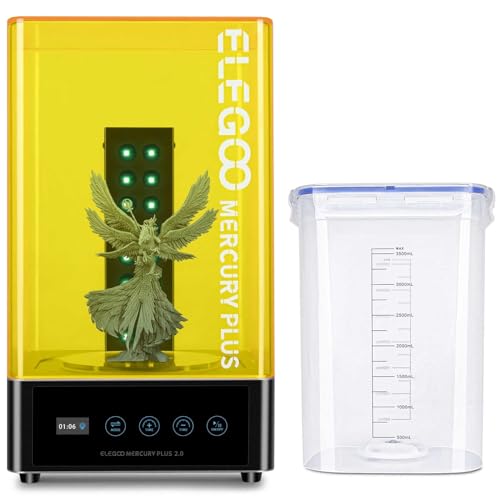
Every resin print needs washing in isopropyl alcohol and UV curing before it is safe to handle bare-handed and before it reaches full strength. If the printer you are considering does not include one, budget for a separate wash and cure station, like the Anycubic Wash and Cure 3 or Elegoo Mercury Plus, as part of the true starting cost.
Higher resolution means smaller details, not necessarily bigger prints
Resolution figures like 10K, 12K, 14K and 16K describe how finely the screen can define detail across the build area, not how large an object the printer can produce. A higher resolution number improves fine detail on miniatures and jewelry-scale work more than it changes overall build volume.
Ventilation is part of the setup, not an accessory
Resin printing produces stronger, more consistent odor than FDM printing, both from the liquid resin and from the isopropyl alcohol used to wash prints. Plan for a ventilated space or an enclosure with active airflow before your first print, not after the smell becomes a problem.
Larger vats mean more liquid resin to handle safely
A larger-format resin printer, like the Photon Mono M7 MAX in this roundup, holds more liquid resin in its vat at once. That means more resin exposure risk during vat changes and cleanup, and it raises the stakes on proper gloves and a clear disposal plan.
Other options worth knowing about
- ANYCUBIC
ANYCUBIC Wash and Cure Machine 3.0 with Twistable Gooseneck Light
$129.99 Check pricePrices change often - ANYCUBIC
ANYCUBIC Wash and Cure 3 Plus Station for LCD/SLA/DLP 3D Printer
$159.99 Check pricePrices change often - ANYCUBIC
ANYCUBIC Photon Mono 4, Resin 3D Printer with 7'' 10K Mono LCD Screen
$209.99 Check pricePrices change often



Safety
Common questions
Is resin 3D printing dangerous?
Uncured resin is a skin sensitiser and can cause irritation or an allergic reaction with repeated contact, so nitrile gloves and good ventilation are necessary, not optional. Cured, fully hardened prints are generally safe to handle, but the liquid resin and the wash step both require care and the right protective equipment.
What is included with a resin printer bundle?
Some resin printers, like the Anycubic 10K bundle in this roundup at $199.06, include a wash and cure station in the box. Others are sold as the printer alone, in which case a wash and cure station, resin, isopropyl alcohol and gloves need to be bought separately to actually use the printer.
Can I pour used isopropyl alcohol down the drain?
No. Isopropyl alcohol used to wash resin prints carries dissolved uncured resin and should not go down a household drain. Let the resin settle out or cure the used IPA in sunlight or under UV light, then dispose of the solid waste according to your local hazardous waste guidance, not through plumbing.
What resolution do I need for a resin printer?
A 10K screen is enough detail for most hobbyist miniatures and general models. Move up to 12K, 14K or 16K only if a specific project needs finer surface detail, such as small-scale figures with fine facial features or intricate jewelry patterns, since higher resolution does not change build volume or speed.
Do I need a fume extractor for a resin printer?
A dedicated fume extractor is not required for occasional resin printing in a well-ventilated room, but an open window or active airflow is strongly recommended. Resin off-gasses noticeably during printing and washing, and an enclosure without airflow will concentrate that odor rather than remove it.